Square Dot
Square Dot Feature (Scribe Units Only)
I-Mark systems offer a Square Dot marking option for Data Matrix codes.
Square Dot replaces standard round dot impressions with high-resolution square marks.
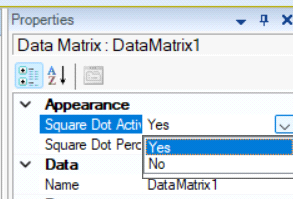
Square-Dot is a Patented method of marking a 2D Barcode developed by Columbia Marking Tools. The method implements an alternative means of marking the 2D code by drawing a square for each of the elements within the 2D code instead of the impacted dot done by all standard marking companies. This method can be used in the I-Mark software by setting the property field for a Data Matrix Code of Square-Dot to True and setting the Square-Dot Percentage to a value which would make the greatest effect you are requiring.
Benefits of Square Dot
- Improved readability on rough or irregular surfaces
- Enhanced scanning performance on castings
- Improved legibility on parts with heavy machining marks

Enabling Square Dot
- Select the Data Matrix entity in the layout.
- Open the Properties dialog, or the entity tab of the data matrix and click square dot in the appearance section.
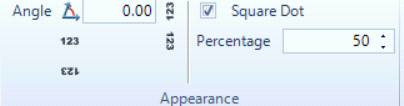
- Locate the Square Dot setting.
- Select Yes to enable Square Dot marking.

Dot Percentage Adjustment
The Dot Percentage setting controls the relative size of the individual marked elements within the Data Matrix.
- Increase the value to enlarge dot size.
- Decrease the value to reduce dot size.
Dot Percentage should be adjusted according to material type, surface finish, and marking depth requirements. Improper dot sizing may affect code readability.
Created with the Personal Edition of HelpNDoc: What is a Help Authoring tool?