Update License Key
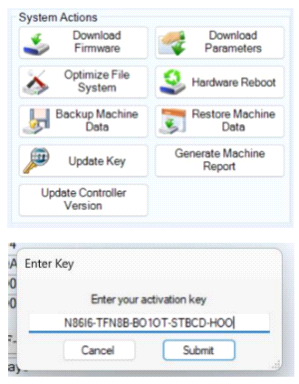 Our term-sale products ship with a temporary license key. When this key expires, you will see a “Key Expired” Fault pop up if you try to make a mark and the machine will not run. We recommend registering your product before this key expires to avoid interruptions in production. Here’s how:
Retrieve your Machine ID number:
- Ensure the Controller is connected to the operator PC and powered on.
- Open the I-Mark Software and connect to the Controller as though you were preparing to make a mark.
- Click on “Diagnostics” and document the 8-character Machine ID. You will need to provide this on the registration form later.
Note: The days remaining on your temporary license is shown under the Machine ID.
Online Registration Form
Click the link above to access our online registration form and provide the requested information. The information will automatically be emailed to us at CMT. Allow one business day for a response.
If you have trouble clicking the link, you may also cut and paste https://marking-machines.net/I-Mark_Registration.html in your browser to reach the registration form.
Upon receiving your Registration info, CMT will verify your purchase and supply you with a permanent License Key.
1. With the Controller on and connected to the operator PC, return to “Diagnostics” in the I-Mark Software.
2. Click on “Update Key” in the System Actions group.
3. When the dialog window pops up, simply copy and paste the key CMT provided into the field and click “Submit.”
4. The I-Mark software will do a soft reset of the Controller and be ready to use again.
Note: in some instances, when the Controller reconnects to the I-Mark software, the Machine ID will not be visible. Simply restart the I-Mark software and power cycle the controller to clear this error.
Created with the Personal Edition of HelpNDoc: Eliminate the Struggles of Documentation with a Help Authoring Tool